 NEWS
NEWS
Apple Properly Fixes the 1+2+3 Calculator Bug in iOS 11.3, Brings Back the Animation
 02/01/2018
 1791
1791
There was a big furore in October when the community discovered that the redesigned Calculator app in iOS 11.0 had a semi-serious bug; people noticed that if you typed 1 + 2 + 3 quickly, it would give the incorrect answer. The real problem here was that the fade animation on the operand buttons (+, – etc) would block user interaction until it completed. This meant that if you typed quickly, the second press of the + button when typing 1 + 2 + 3 would be ignored, but really this happened with any combination of inputs that pressed the operands quickly.
In iOS 11.2, Apple ‘fixed’ this issue. They removed the animation altogether making state changes instantaneous. It quelled complaints, but obviously was not what was originally designed. In iOS 11.3, Apple will rollout the true fix – the animations are back, and do not block user interaction.
iOS 11.0 had a brand new Calculator app with operand buttons that faded in and out when highlighted. iOS 11.2 removed the fade animation altogether to patchwork fix the bug. iOS 11.3 brings the animations back and users can still tap the buttons in quick succession.
You can see the difference in the video below; focus on the Calculator’s + button to see the change from instantaneous flashes of colour to a smooth fade from orange to white.
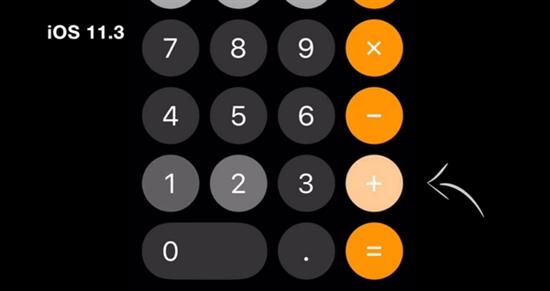
The fade effects are fast and subtle, but I’m glad to see Apple double-backed on this to fix it properly. When the Calculator was designed, they obviously wanted the animated states to be there because they were included in the iOS 11.0 and iOS 11.1 releases. When iOS 11.2 solved the issue with a quick fix, I was a little disappointed to see that the design had been compromised and there was no guarantee that they would go back and wire it up to restore the original animation behavior.
There have been other cases since iOS 7 where seemingly quick fixes have stayed around, unchanged, for years. I’m happy to report this is not of those cases here.
With iOS 11.3, the animation behaves as it should and the calculations are computed correctly. This should be the final installment in the Calculator bug saga.
Is this a big deal? No. But a lot of small details like this add up to the overall iOS experience and the Apple brand is synonymous with attention to detail in hardware. Care in software has been more scattershot in recent years, so I’m encouraged by changes like this one.
iOS 11.3 is in developer beta now and will be released to all customers sometime in the spring. Alongside bug fixes like this one, it includes new Animoji, iMessage Business Chat, Health Records integration and several other flagship features.
For iOS 12, Apple is rumored to be focusing resources towards performance, reliability and bug fixes, so hopefully cases like the Calculator saga will be caught sooner, ideally before they ship in the first place.
Source: 9to5mac