NEWS

Jake Blair Team Demos Spicy Untether for iOS 11.x

02/20/2019

1958

Jake Blair Team Demos Spicy Untether for iOS 11.x


The infamous Jake Blair development team recently demonstrated an untetherer for iOS 11.x. Here’s when the untethered jailbreak will be released.


Spicy is an upcoming untether package for iOS 11 developed by the Jake Blair development team. 


It is based on a new kernel vulnerability that Apple patched in iOS 12 before Electra jailbreak gained iOS 11.4.1 support. 


This untether package essentially writes a script, which fires each time you reboot, into the bootchain.


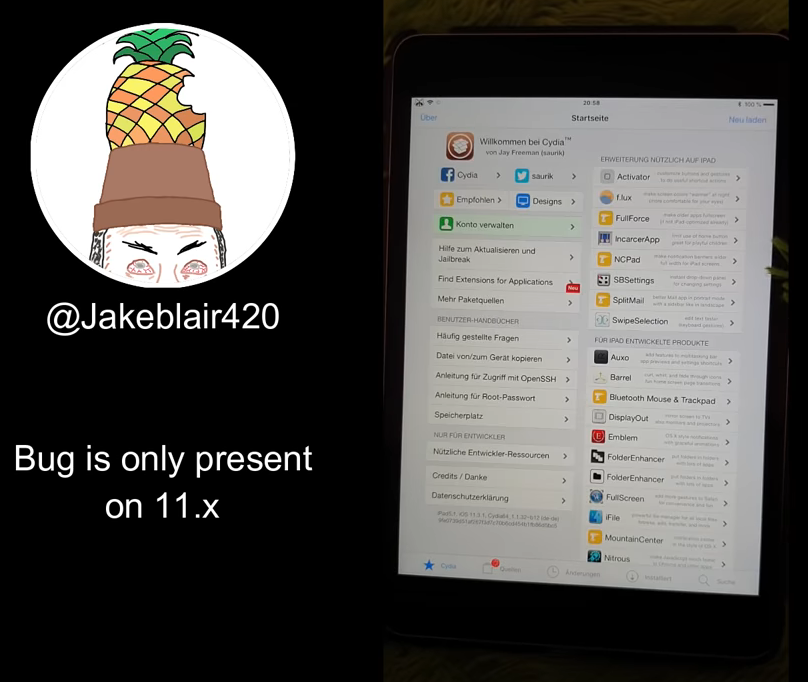
The Jake Blair development team posted the video below on their official YouTube channel.


While Spicy is a fully untethered jailbreak, it does have a few caveats. For instance, there’s a slight delay after the boot-up sequence while the tool runs some scripts in the background.


This results in significantly higher boot-up times as compared to stock firmware. Developers Siguza and Ben Sparkes want to speed things up but, again, no promises have been made. 


This is a monumental development, especially considering the fact that untethered jailbreaks have all but disappeared from the scene in recent years.


Some even consider untethers to be a thing of the past with all those stringent security measures Apple adds to its operating system on a regular basis.


Since a lot of users prefer a complete jailbreak experience of an untethered jailbreak, iOS 11 users will likely hold off on upgrading their Apple device to iOS 12.


Source: yalujb
Windows
Mac OS
iOS
Linux
3uTools
Win 64-bit For this device
V6.0.1 2024-12-18
Download
Win 32-bit For this device
V6.0.1 2024-12-18
Download
3uTools
Intel Chip How to Identify Chip Type
V6.0.1 2024-12-18
Download
Apple Silicon
V6.0.1 2024-12-18
Download
How to Identify Chip Type
1.  Click the Apple icon in the top-left corner of the screen and select About This Mac.
2.  Check the Processor or Chip field to determine if it is "Intel" or "Apple".
Please use the 3uTools PC client to install the iOS client:
1、 Install either the Windows or Mac version of 3uTools on your computer
2、 Open the PC client and connect your device to the computer via USB cable
3、 After the connection is successful, wait for the computer to automatically install the mobile app for the device, or locate “Install Mobile App” on the computer and manually click to install.
3uTools
deb file
V6.0.1 2024-12-18
Download
rpm file
V6.0.1 2024-12-18
Download
Windows
Windows
iOS
iOS
Android
Android
TV
TV
3uAirPlayer
Win 64-bit For this device
V6.0.1 2024-12-18
Download
Win 32-bit For this device
V6.0.1 2024-12-18
Download
iOS Device Mirroring (No App Required)
1、 Install 3uAirPlayer on the Windows PC
2、 Open Control Center and select Screen Mirroring
3、 From the list, choose your PC to start mirroring
4、 Or connect your iOS device to the PC via USB to begin mirroring
Scan to get "3uAirPlayer" App
3uAirPlayer TV V6.0.1
2024-12-18
TV System Requirements: Android 7.0 or later
Download the TV installation package, copy it to a USB drive, insert it into your TV or set-top box, then select the file from the home screen to install.