NEWS

Apple Confirms Acquisition of Self-Driving Vehicle Startup Drive.ai

06/26/2019

1379

Apple purchase Drive.ai, an autonomous driving startup based out of Mountain View, the company confirmed to Axios today. 

Apple has hired dozens of Drive.ai engineers, and Drive.ai has ceased all operations over the course of the last few weeks. 
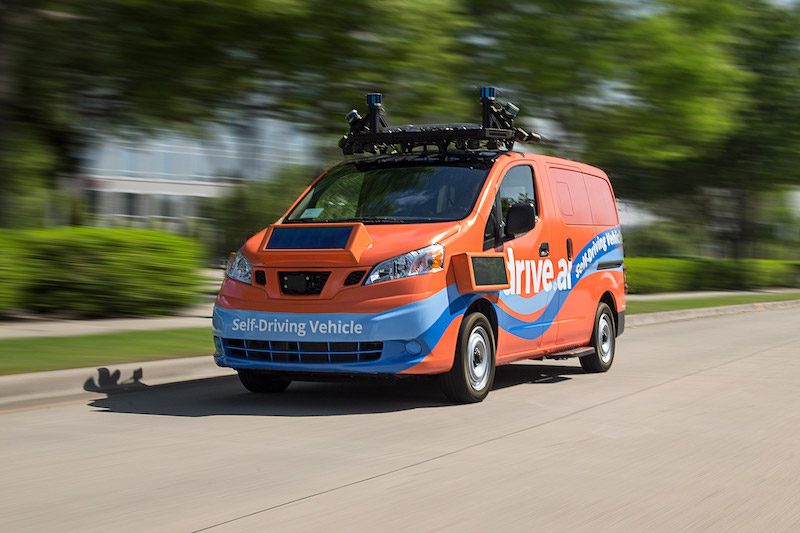
Apple Confirms Acquisition of Self-Driving Vehicle Startup Drive.ai
Rumors in early June suggested Apple was in the process of acquiring Drive.ai to boost its in-house development of a self-driving vehicle system. 

The deal at the time was described as an acqui-hire, suggesting Apple was interested in the company for its employees rather than its technology. 

Drive.ai was first founded in 2015 by a group of Stanford University students, and launched a self-driving shuttle service in select cities in Texas. The company ran into difficulties, however, and sought out a buyer, which turned out to be Apple. 

There's no word on the purchase price, but Axios says Apple has taken on new hires in the areas of engineering and product design. 

Rumors have suggested that as part of its self-driving car efforts, Apple is working on a self-driving campus shuttle service to drive employees between the company's various Bay Area offices. 

Apple's Drive.ai acquisition confirms that work on the Apple Car project is still underway. Apple in February laid off 190 employees in its self-driving car division as part of a restructuring effort.


Source: MacRumors
Windows
Mac OS
iOS
Linux
3uTools
Win 64-bit For this device
V6.0.1 2024-12-18
Download
Win 32-bit For this device
V6.0.1 2024-12-18
Download
3uTools
Intel Chip How to Identify Chip Type
V6.0.1 2024-12-18
Download
Apple Silicon
V6.0.1 2024-12-18
Download
How to Identify Chip Type
1.  Click the Apple icon in the top-left corner of the screen and select About This Mac.
2.  Check the Processor or Chip field to determine if it is "Intel" or "Apple".
Please use the 3uTools PC client to install the iOS client:
1、 Install either the Windows or Mac version of 3uTools on your computer
2、 Open the PC client and connect your device to the computer via USB cable
3、 After the connection is successful, wait for the computer to automatically install the mobile app for the device, or locate “Install Mobile App” on the computer and manually click to install.
3uTools
deb file
V6.0.1 2024-12-18
Download
rpm file
V6.0.1 2024-12-18
Download
Windows
Windows
iOS
iOS
Android
Android
TV
TV
3uAirPlayer
Win 64-bit For this device
V6.0.1 2024-12-18
Download
Win 32-bit For this device
V6.0.1 2024-12-18
Download
iOS Device Mirroring (No App Required)
1、 Install 3uAirPlayer on the Windows PC
2、 Open Control Center and select Screen Mirroring
3、 From the list, choose your PC to start mirroring
4、 Or connect your iOS device to the PC via USB to begin mirroring
Scan to get "3uAirPlayer" App
3uAirPlayer TV V6.0.1
2024-12-18
TV System Requirements: Android 7.0 or later
Download the TV installation package, copy it to a USB drive, insert it into your TV or set-top box, then select the file from the home screen to install.