 NEWS
NEWS
Apple Patches Fixed Security Bug That Allowed Iphone Jailbreak
 08/27/2019
 2475
2475
Apple has fixed a security flaw for a second time after it accidentally reintroduced an old bug in a recent software update.
Released Monday, iOS 12.4.1 contains a security fix that was first patched months earlier in iOS 12.3. Apple rolled out a fix in May, but accidentally undid the security patch in its latest update, iOS 12.4, in July.
In a brief security advisory published after the software’s release, Apple said it fixed a kernel vulnerability that could have allowed an attacker to execute code on an iPhone or iPad with the highest level of privileges.
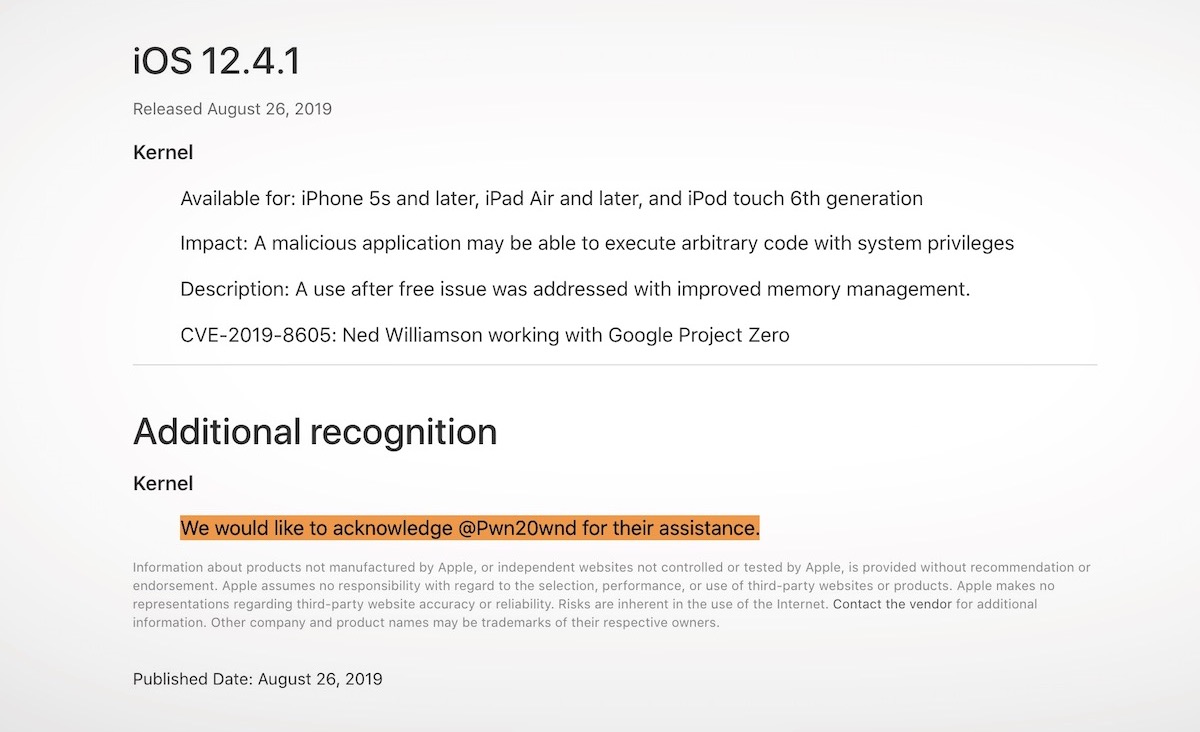
Those privileges, also known as system or root privileges, can open up a device to running apps that are not normally allowed by Apple’s strict rules. Known as jailbreaking, apps can access parts of a device that are normally off-limits. On one hand that allows users to extensively customize their devices, but it can also expose the device to malicious software, like malware or spyware apps.
Spyware apps often rely on undisclosed jailbreak exploits to get access to a user’s messages, track their location and listen to their calls without their knowledge. Nation-states are known to hire mobile spyware makers to remotely install malware on the devices of activists, dissidents, and journalists. Washington Post journalist Jamal Khashoggi, who was murdered by agents of the Saudi regime, is believed to have been targeted by mobile spyware, according to reports. The company accused of supplying the spyware, Israel-based NSO Group, has denied any involvement.
Apple confirmed it pushed out a fix in its security notes, which included a short acknowledgment to Pwn20wnd, the team that confirmed last week that its jailbreak was working again.
The same kernel vulnerability was fixed in a supplemental update for macOS 10.14.6.
Source: techcrunch